How to list your shop on Meku Marketplace
Get your shop in front of customers who don't know you exist yet — the marketplace listing, the support call, and the verified-purchase reviews that follow.
Your storefront serves customers who already know your URL. The marketplace at meku.co.tz serves the much larger group who don’t know you exist yet. Joining is free and built into every plan — but it goes through a one-time review so the experience stays good for both shoppers and shops.
What you need before you start
- A logo and banner for your store (square logo, landscape banner)
- A 1–2 paragraph description of what you sell and why someone should buy from you
- A pickup address with a phone number we can reach you on
- Your products listed and in stock
Step 1: Open the marketplace page
Tap Marketplace in the side navigation. If you’ve never visited it, you’ll see an amber banner: “Your shop is pending marketplace authorization.” That’s the review queue — your shop is invisible to marketplace shoppers until a real person at Meku has called you, walked you through what’s expected, and flipped the switch.
The pending state is normal. The page is fully usable while you wait.
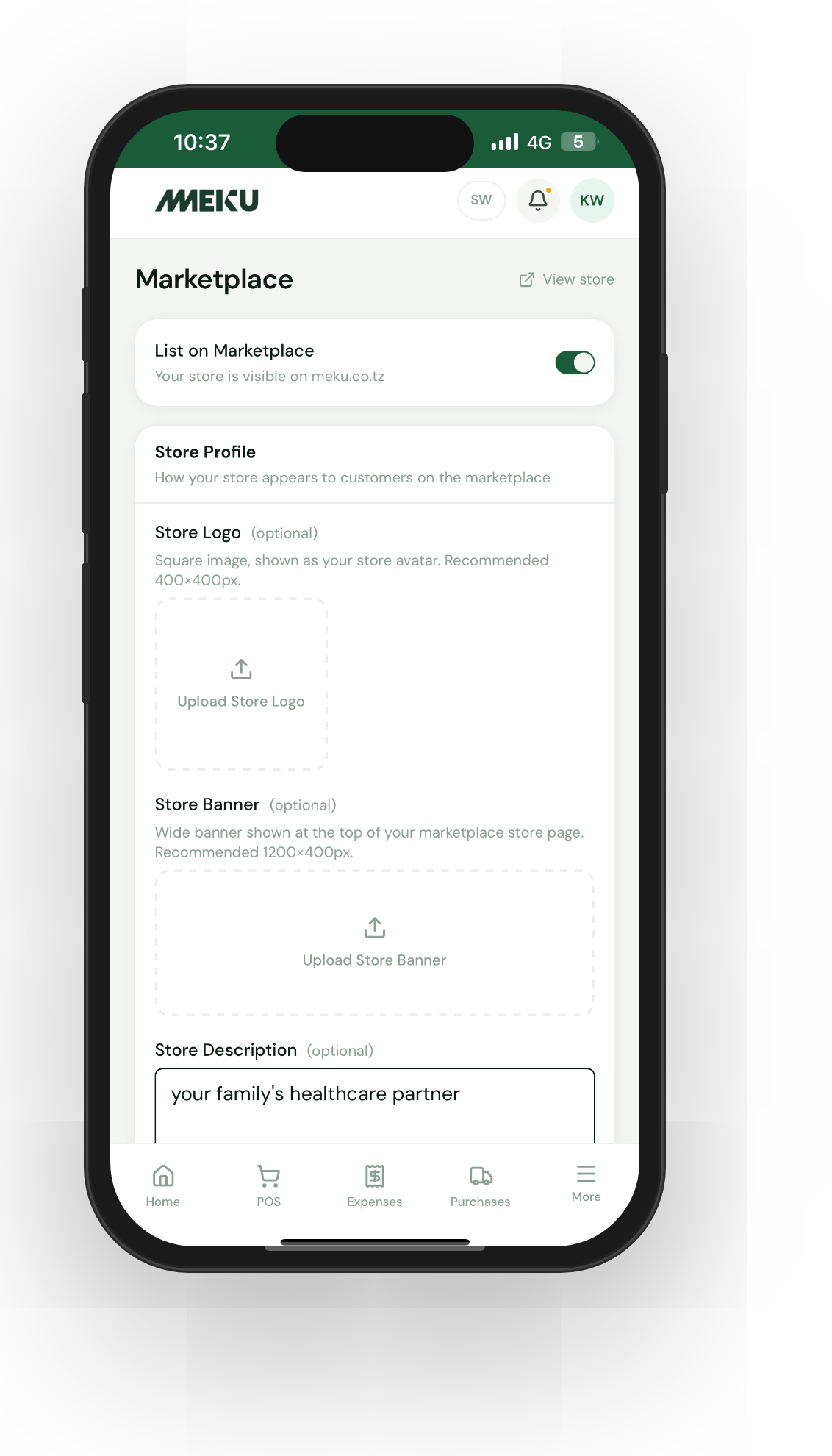
Step 2: Configure your store profile
Fill in three blocks:
- Logo — circle-cropped, shown next to your name across the marketplace. Use the same logo as your storefront for brand consistency.
- Banner — landscape image shown across the top of your store detail page. Keep important detail away from the bottom-left corner — your logo and name overlay there.
- Description — what makes your shop worth visiting. Be specific: not “good prices on phone accessories” but “iPhone-genuine cases and screens, Samsung official accessories, 24-hour delivery in Dar.”
Save when you’re happy. This is what the marketplace shopper sees when deciding whether to tap your card.
Step 3: Set an announcement (optional)
Your marketplace announcement is separate from your storefront one — you can run different messages in each surface. Most owners leave it blank and turn it on for specific moments (a seasonal sale, a new product launch, an apology for a delivery delay).
Step 4: Wait for the call
Within a day or two of saving your profile, a Meku support agent will call the phone number on your account. The call covers:
- What you sell and how you fulfill (in-house delivery vs courier vs pickup)
- Your hours and response time on inquiries
- Terms of use and customer-protection commitments
It takes 10–15 minutes. Once we’re confident your shop is ready, we flip the authorization on and your store goes live on the marketplace immediately.
Tip: Have a working SIM in the phone number on your Meku account during business hours after you save your profile. Missing the support call delays your go-live by another day or two.
Step 5: Respond to reviews
Once you’re live and your customers start ordering, they can leave reviews on delivered orders. Reviews are verified purchase only — no one can review a product they didn’t buy. You can respond to reviews from the product page (look for the Reviews panel; your sidebar shows a red badge with the count of unresponded reviews).
A short, personal response to a 4-star review often turns it into a 5-star follow-up. A defensive response to a 2-star review almost always makes things worse — acknowledge, fix, move on.
Common questions
Why does Meku review shops manually? Because the marketplace’s reputation depends on every shop on it. One unresponsive merchant tarnishes the experience for the next twenty. The 15-minute call has done more for marketplace quality than any algorithm we could write.
Do I have to be on the marketplace?
No — you can switch off Marketplace listing under Settings → Business at any time. Your storefront is unaffected; only your visibility on meku.co.tz goes away.
What does Meku take from a marketplace sale? A service fee added to the customer’s total — you receive the full merchandise price (the subtotal). The fee is shown to the customer at checkout as a separate line and doesn’t come out of your earnings. Delivery fees flow to the delivery provider; Meku doesn’t keep those either.
What to read next
- How to customise your Meku online storefront — the in-depth version of “your store profile”.
- How to fulfil online orders on Meku — what happens once a marketplace order arrives.
- How to set prices using Meku analytics — being on the marketplace gives you direct comparison with competitors; pricing matters more.
Open merchant.meku.co.tz/marketplace to start.